📁 Project Request App — Self-Service Project Creation for Foundry
A full-stack workflow application that lets employees request new Foundry projects through a clean form, admins review and approve with one click, and the project is automatically created with the correct security groups assigned — no manual work, full audit trail.
What & Why
The Problem
Creating a Foundry project is a multi-step manual process: an employee sends a message or email to an admin, the admin manually creates the project, then manually adds security groups to Owner/Editor/Viewer roles. There's no audit trail, no standardization, and it's slow — especially at scale when dozens of teams need projects weekly.
The Solution
A self-service web application with two interfaces:
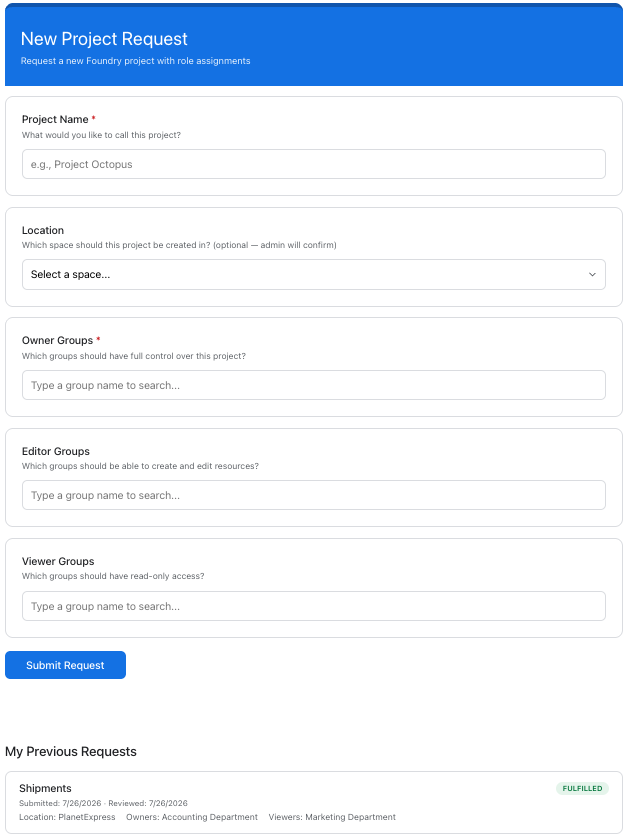
- Employee view — A simple Google Forms-style interface where users name their project, pick a location, and search for security groups to assign to each role
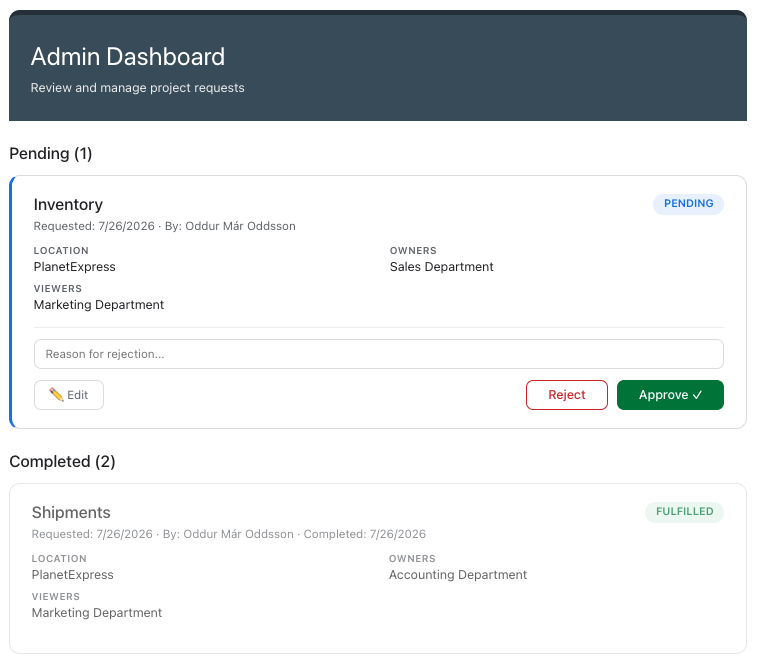
- Admin view — A dashboard showing all pending requests with full details, the ability to edit before approving, and one-click approve/reject
- Automatic fulfillment — Upon approval, the project is created via the Foundry API with the correct groups assigned. No manual steps.
The Impact
- Zero manual project creation — admin clicks Approve and the project exists with correct permissions
- Full audit trail — who requested what, who approved, and when
- Standardized process — every project follows the same creation workflow and permission model
- Self-service at scale — works for 5 users or 5,000
How It Works
User Workflow
Employee opens app → Fills form (name, location, groups) → Submits
→ Request stored as "Pending"
→ Admin sees it in dashboard → Reviews → Clicks Approve
→ Project created automatically with groups assigned → Status: Fulfilled
The Request Form
Simple, clean interface. Users search for security groups by name with a typeahead dropdown. Multiple groups can be assigned to each role (Owner, Editor, Viewer). Location is selected from a dropdown of available Foundry Spaces.
Below the form, users see a "My Previous Requests" section showing all their past submissions with current status (Pending, Fulfilled, or Rejected with reason), the groups they requested, and the location — so they always know where their request stands without having to ask anyone.
The Admin Dashboard
Shows all pending requests with project name, requester, date, location, and assigned groups visible at a glance. Admins can approve immediately or click Edit to modify groups/location before approving. A rejection reason is required when rejecting.
Only members of the designated admin group can access this page — non-admins see nothing.
Built-in AI Help
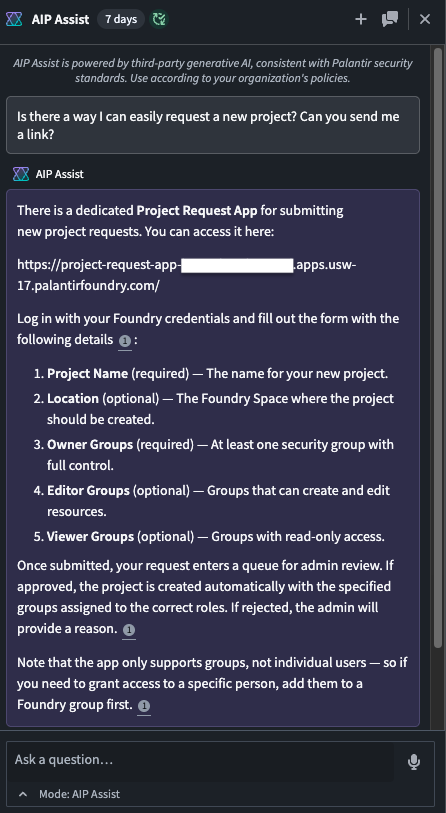
The app's documentation is connected to Foundry's AIP Assist, meaning any user can open the AI sidebar and ask natural language questions like "How do I request a new project?" or "What's the difference between Owner and Editor?" — and get instant answers without leaving Foundry.
Under the Hood
Architecture Diagram

Technology Stack
| Layer | Technology | Purpose |
|---|---|---|
| Frontend | React, TypeScript, CSS Modules | Google Forms-style request form + admin dashboard |
| Authentication | OAuth2 via @osdk/oauth | Secure user login with scoped API access |
| Semantic Layer | Foundry Ontology | ProjectRequest object type with edit-backed storage |
| Workflow | Foundry Action Types | Submit, Approve, Reject, Fulfill — with validation rules |
| Backend Functions | TypeScript v2, Rest API | Project creation, group search, space listing via service token |
| Security | OAuth2, action permissions, row-level filtering, Data Connection secrets | Multi-layered: UI hides admin page, Foundry blocks unauthorized action execution, data layer restricts visibility to own requests |
| AI Documentation | Foundry Notepad → AIP Assist | Users ask natural language questions about the app |